Eurocharged support

MyGenius handheld

Install the PC client, update your device, read your stock file, then flash your tune. Read this page in full before you start.
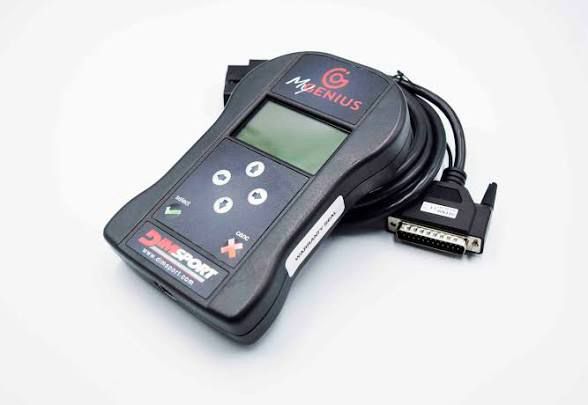
Eurocharged MyGenius handheld tuning device

Windows / PC only. Read everything below before tuning.

Always have a battery charger connected while tuning.

Software & video

MyGenius Client V2

Windows installer for MyGenius desktop software.

Preparing secure download…

Instructional video

Watch the walkthrough on YouTube before your first session.

Watch on YouTube

Getting started & retrieving stock file

Goal: update the device, identify/read the stock file, then save it for upload.
  1. Install & connect on PC: Install MyGenius using Download MyGenius, then plug the handheld into your computer and wait for the main menu.
  2. Run update cycle (3 times): Click Update, select one checkbox, and repeat this process until three different checkboxes are completed.
    If you forget which ones were done, start over and repeat the cycle.
  3. Connect to vehicle: Plug the OBDII accessory into the car and handheld, then turn key to position 2 (dash lights on).
  4. Identify ECU: On handheld main menu, go to Work -> PRT Identify, follow prompts, then open ID and continue until process completion.
  5. Download stock file: Turn car off, reconnect handheld to computer, open MyGenius, choose Download From MyGenius, select stock file, and save it on desktop.
  6. Submit to Eurocharged: Upload the file here with invoice, modifications list, fuel type, and any special requests.

It is a 24–48 business hour turnaround once we receive your submission.

Installing a file

  1. Once you receive your tune file, save it to your desktop. You will not be able to open it because it is encrypted.
  2. Connect the handheld to the laptop/desktop.
  3. Open the MyGenius software; all the tabs should light up.
  4. Click on the Upload to MyGenius tab.
  5. Select the tune file and allow it to save on the handheld. The software will tell you when it's complete.
    You can now go out to your car and plug in OBDII.
  6. Turn the key to position 2. The dash will light up and you'll see how much fuel you have.
  7. The handheld screen will light up and show the main menu.
  8. Click on the Work tab.
  9. Click on the Write tab.
  10. Select the tune file (or stock file) and follow the screen prompts.
  11. The handheld will tell you when the tuning process is completed.
  12. After the tune is on the vehicle you can turn the car off and unplug the handheld.

Your vehicle is now tuned!